choicescript_stats.txt
本文面向 ChoiceScript 的初学者。不过,如果您尚未开始学习,那么最佳起点应是本《ChoiceScript 游戏开发入门》系列关联文章中的第一篇:《[[基础教程]]》。
本文探讨了 choicescript_stats.txt 这个文件的作用(也称为状态界面),其中显示用作角色统计数据的变量,这一功能有时也通过使用 *stat_chart 命令来实现,该命令也在此处进行说明。
使用 *stat_chart|Using *stat_chart
*stat_chart|Using *stat_chart*stat_chart 命令能够以多种不同方式轻松显示变量。该命令通常用于 choicescript_stats.txt 文件中,该文件控制状态界面的显示,示例可在 "scenes" (..mygame\scenes) 文件夹中找到,但也可根据需要用于任何普通 [[场景]]。单个文件中使用此命令的次数没有限制。
注意:任何用于在 *stat_chart 中显示百分比条的数字变量,不应因其他脚本的影响而超出 0-100 的范围,否则会对百分比条的外观产生不良影响。确保这种情况永不发生的最佳方法是使用 "Fairmath" 系统:参见“[[算术运算符]]”。
假设您有三个变量:包含玩家角色名称的字符串变量 "name";包含 0 到 100 之间数字的数值变量 "intelligence"(智力);以及同样取值范围在 0 到 100 之间的数值变量 "wisdom"(智慧)。以下是如何在 *stat_chart 中使用它们进行显示的示例:
*stat_chart
    text name
    percent intelligence
    percent wisdom
这将显示为:
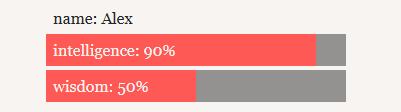
但如果你希望以不同方式大写您的属性名称呢?只需按照您希望它们显示的样子准确输入这些变量名,这样你最终可能会得到类似这样的结果:
*stat_chart
    text NAME
    percent Intelligence
    percent wIsDoM
这将显示为:
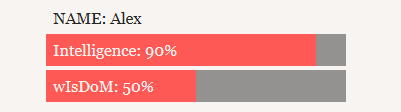
但假设您希望将 “Intelligence” 显示为 “Cleverness”(聪明程度),但不想更改实际变量名。在变量名之后添加的任何内容都将成为图表中新的显示文本,因此您可以输入:
这将显示为:
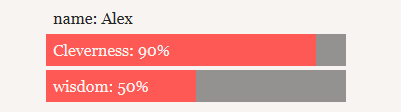
请注意此方法同样适用于多个词语。
使用对立属性|Using opposed pairs
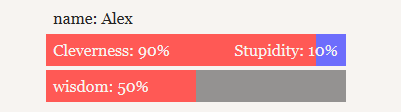
But let's say you wanted to write something at the end of a stat bar. For example, if you wanted to make an opposed pair out of intelligence and stupidity. Simply change the percent line to opposed_pair and add another line, indented one more level, and the text intended to be displayed opposite the variable. So something like this:
Which will display as:
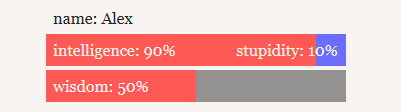
Note that there is no actual "stupidity" variable; that is just text being displayed at the end of that stat bar.
In opposed pairs you can also make the variable "intelligence" display as "Cleverness" instead, for example:
Displays as:
Stats screen in general
Depending on the nature and content of your game, you can also use the Stats Screen for displaying a range of other information pertaining to the player-character. There are many possibilities so the best way to approach this subject is to study the stats screens of existing games, as many do different things and in various ways.
One good example of this variety is the actual original ChoiceScript game itself, Choice of the Dragon (full credit for this code snippet going to CoG; clicking that link will take you to the game). In Choice of the Dragon, the player can see on the Stats Screen precisely how wounded they are, according to the "wounds" variable:
0 = Uninjured
1 = Battle-scarred
2 = Permanently wounded
3 = Permanently weakened
4 = At Death's door
Choice of the Dragon uses the following code to display the appropriate information:
Simple Inventory System
A common feature for a Stats Screen in a Choice game is an inventory of items currently held in the player's possession. Although there are several ways of doing this, a typically neat system might be as follows:
Although the items in a game would be best defined in startup.txt as permanent variables using the *create command, we have listed them here as *temp boolean variables to show the current status (true or false - i.e. whether or not this item is currently in the player's possession). In the example above, only half of the possible items are in the player's possession, so the above example would display as:
Inventory: Eggs, Bacon, Tomatoes.
If all the possible items were presently true it would instead display as:
Inventory: Milk, Eggs, Bacon, Sausage, Tomatoes, Mushrooms.
If relatively new to ChoiceScript, the process of setting up and using this inventory system is described in more detail in this forum topic.
Creating a multiple stat page navigation system
Sometimes, stat screens can become very long and cluttered. You can break up stats onto several different pages. In the following example, we will have a general stats page, one page for personal stats, one for NPC relationship stats and another for a glossary.
The temporary variable named 'stat_page' keeps track of which page the player is on by setting a new value each time the player picks an option. The menu option to "View relationship status" for example is only shown when the player is not on that page as dictated by the *if (stat_page != 2) command preceding the option.